
Eurotrader fully supports automated trading through Expert Advisors (EAs) and trading robots on both MetaTrader 4 (MT4) and MetaTrader 5 (MT5) platforms. Automated trading allows clients to execute strategies automatically based on pre-programmed rules, helping traders manage positions efficiently and reduce manual intervention.
In addition to the robots and EAs available directly within the trading platform, clients can also upload compatible automated trading programs downloaded from external providers.
What is an Expert Advisor (EA)?
An Expert Advisor (EA) is an automated trading program designed to analyse market conditions and execute trades according to predefined parameters. EAs can help traders automate strategies, manage risks, and monitor markets continuously without requiring manual execution.
How to Install a Trading Robot or EA in MT4/MT5
Follow the steps below to upload and activate your trading robot:
Step 1: Open the MetaTrader Platform
Log in to your Eurotrader MT4 or MT5 trading platform using your trading account credentials.
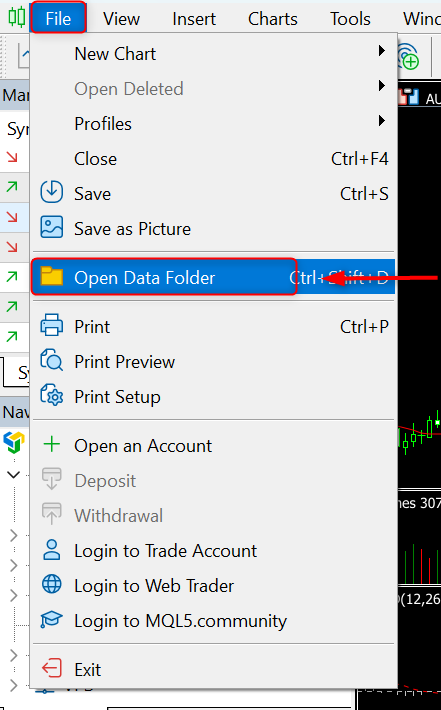
Step 2: Access the Data Folder
-
Click File from the top menu.
-
Select Open Data Folder.
Step 3: Locate the Correct Folder
-
Open the MQL4 folder (for MT4 users) or MQL5 folder (for MT5 users).
-
Navigate to the Experts folder.
-
Open the Advisors folder.
Step 4: Upload the Trading Robot
You can upload your EA using one of the following methods:
-
Copy the downloaded robot or EA file and paste it into the Advisors folder.
-
Alternatively, open both the download location folder and the Advisors folder, then drag and drop the file into the destination folder.
Step 5: Restart the Platform
After copying the EA file, restart your MetaTrader platform to allow the system to recognise and load the program.
Step 6: Activate the Trading Robot
-
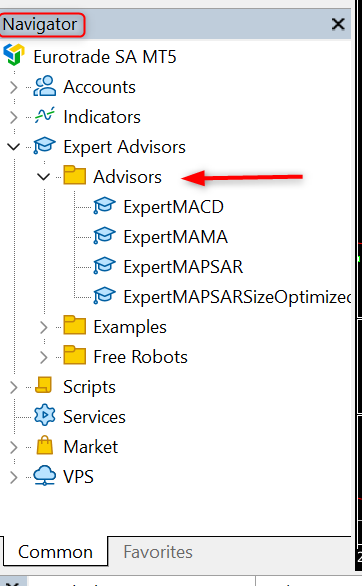
Open the Navigator window within MetaTrader.
-
Locate Expert Advisors → Advisors.
-
Drag the EA onto your preferred trading instrument chart.
-
Enable AutoTrading (MT4) or Algo Trading (MT5) to allow automated execution.
Important Considerations
-
Ensure the EA is compatible with your platform version (MT4 or MT5).
-
Verify that automated trading is enabled within the platform settings.
-
Always test new robots using a demo account before applying them to live trading.
Automated trading can be a valuable tool for enhancing trading efficiency and strategy execution. Eurotrader provides full compatibility with Expert Advisors to support clients seeking advanced trading solutions.
Need more details? Our support team is always here to help.
Open an account with Eurotrader today!
